
DAST — Purchasing and inventory interface
Every order has a path and every item has a balance. Arabic interfaces connect low-stock alerts, purchase-order review and receipt of its line items.
Explore the project 1 / 1
Project information
- Client
- An original Nextwave project
- Sector
- Commerce & retail
- Platforms
- Web
- Project type
- Business systems
Services delivered
Project overview
A supply problem can start with a single item. DAST follows two familiar operational questions: what is running low, and what needs to happen for it to arrive? The answer connects the operations centre, inventory and purchase order.
Where the design starts
A product list is less useful when disconnected from purchasing. The operator needs stock, minimum levels, ordered quantities and delivery status in one coherent journey.
Receipt also needs a precise meaning: when does stock increase, and can a second click increase it again? These questions shaped the order workflow.
How the workspace is organised
The operations centre highlights orders and replenishment needs. A visual product directory leads into a purchase order with supplier details, line items and execution stages.
Product cards support recognition; the order table supports precise quantity and price review. Each screen serves a different level of attention.
Details that support the workflow
Search by product name or SKU, filter low stock, switch views and edit stock. Create a single-product order and edit line quantities in an existing purchase order.
Orders move through review, preparation and receipt. Confirming a multi-line receipt updates the linked product quantities once and records the received status.
Project images
Explore the interface and experience through the project gallery.
 1 / 3
Use case: identifying replenishment needs
Filter inventory to low-stock products and compare each balance with its minimum. Start an order for the relevant item, enter its quantity and review it. The chosen quantity remains an explicit operator decision.
Use case: reviewing a multi-line order
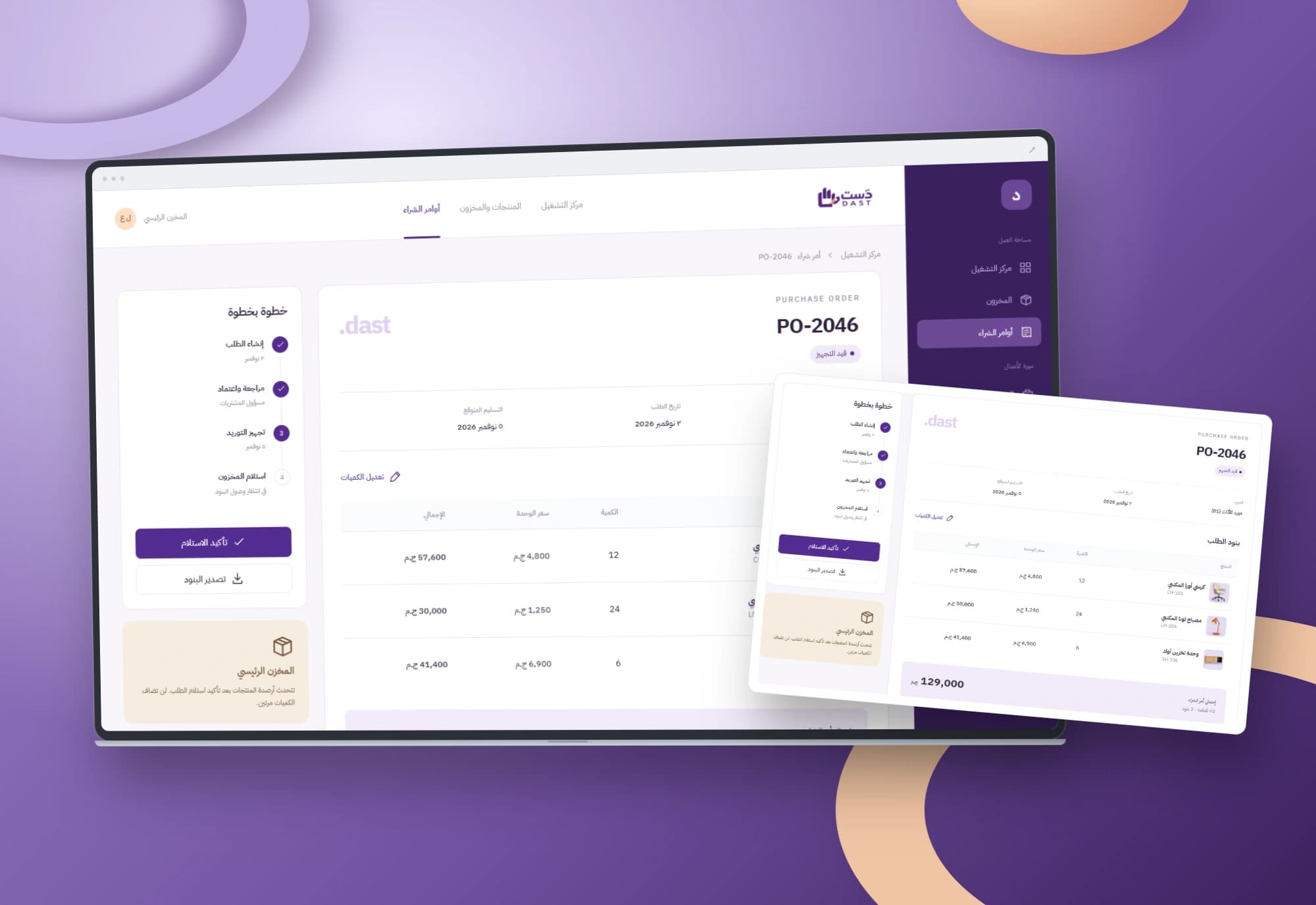
Before delivery, review the supplier, products, quantities, unit prices and totals. Change an agreed quantity and inspect the recalculated values. Preparation remains distinct from receipt: a purchase order alone does not increase stock.
Use case: receiving the delivery
Confirming receipt marks the order as received and adds its quantities to the linked product balances. Return to inventory to inspect the effect, then reopen the order. The same order cannot add stock twice. This flow covers full receipt; partial deliveries require their own rules.
A design that explains itself
Deep purple anchors the workspace, while product imagery and lavender surfaces distinguish items. Text labels accompany status colours.
Mobile product cards remain readable and purchase-order tables scroll within their own region. Additional sidebar modules outline potential product expansion.

Scope of work
The work covers three Arabic operating interfaces, product and purchasing interactions, receipt handling and browser persistence. Additional navigation modules outline the product direction. Shared warehouse data, suppliers and accounting are scoped around each organisation’s workflow.
Built with
- HTML5
- CSS3
- JavaScript
- localStorage
Want purchasing connected to stock movement?
We start with your team’s workflow, then define the data, permissions and integrations needed for a working system.